sdl_game_000
2026 March 18 - Client with wrong colors
I’m implementing a very bare-bones client-server multiplayer for the game. Right now a player can “host” a game (server) and another player can join using the other player’s IP. What happens under the hood is that the client (player joining) will attempt to connect to the server (player hosting), and when that happens, the server will send a message via TCP with the necessary data for the client to create the correct scene on their end.
The message, formed in OnClientConnect(), has this format:
| Section | Data Type |
|---|---|
| Header ID | ServerAccept (uint32_t) |
| Server Name | std::string |
| Client ID | uint32_t |
| Map Name | std::string |
| Player Color | MainColors |
| Spawn Pos Y | int |
| Spawn Pos X | int |
italic rows repeat by the amount of spawns there are
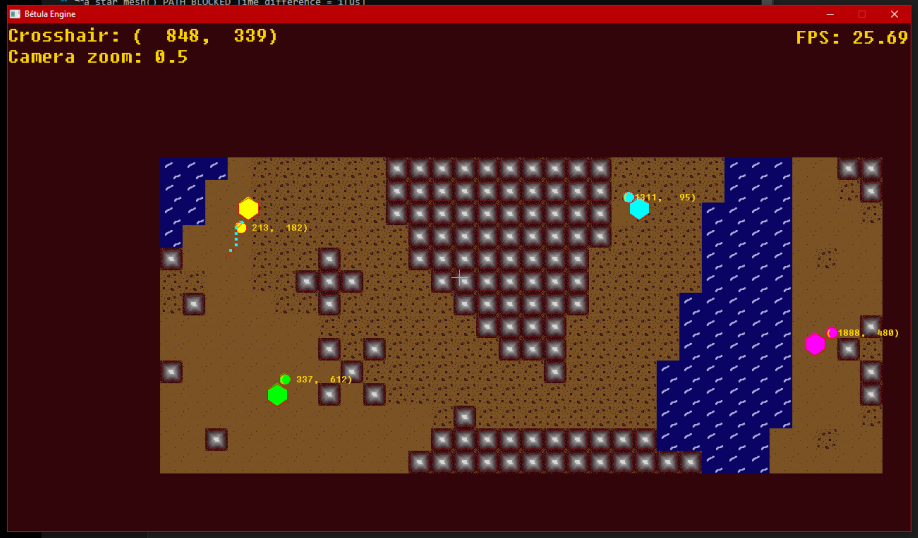
It’s alright for now. Let’s take a look at a regular “match” from the host’s POV. In this screenshot the host has control over the yellow circle, and with the current logic on the server, the next player to join should be automatically assigned to the cyan color, and thus have control over the cyan circle:
Now let’s look at the newly joined player’s perspective:
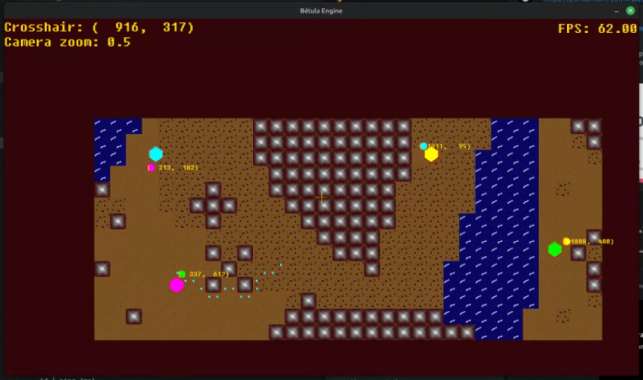
It seems as if the player who joined got assinged the green color. At least he can control that, but there’s all sorts of wrong going on. Why are all the colors messed up?
Well, old me wanted to make things more readable on the server side(understanble), so he had the idea of using an std::map to store where each color was being used, and used that as the main data structure to send back the information to the client. Unfortunately, old me forgot that by saving the std::vector of spawn positions as a map was altering the order, so the host’s scene still had the original order of spawn and colors, while the server object, and therefore, the client’s scene, had an altered version. Poor client was just dealt bad data.
You can see how in this commit’s changes most of the refactor is just me dumbing it down from an std::map to manipulating a few dumb std::vectors. After I changed that then the colors were finally on sync: